
 Jacksonville, FL
 Call (904) 337-4000

The idea that the cloud is inherently more secure than on-premise servers has been taken for granted for years. This assumption is one of the reasons why many businesses migrate. However, hackers are catching up to cloud services. As a result, attacks in cloud computing have increased by 75%.
| “Although cloud malware attacks are on the rise, careful planning and strategic security measures will still keep your cloud infrastructure safe.” — Philipp Graves, CEO of Antisyn |
Instead of taking cloud security for granted, you need to establish security best practices before you migrate. Establishing these practices early will help you drastically reduce your risk of cloud attacks from the start.
That’s why the rest of this article will explore malware in the cloud. We will explain what these threats are, how they work, and what you can do to prevent cyber attacks in your cloud-based systems.
6 Cloud Malware Threats & How to Prevent Them
1. Malicious OAuth Apps
OAuth apps are cloud-based applications that request permission to access parts of your account using secure access tokens instead of your password. While these apps increase security, attackers may also abuse this process by pushing a fake app that asks for broad permissions.
When a user clicks Allow, the cloud provider gives that app an access token and a refresh token. The app then connects to your data through the provider’s APIs and keeps access until you remove those permissions.
You can reduce this risk by requiring admin approval for all new cloud app connections and allowing only apps from verified publishers, and reviewing app permissions regularly. Remove any unused or suspicious apps from your cloud accounts immediately.
Increase Cloud Security by Choosing Expert Managed Cloud Services
2. IMDS Token Stealers
Cloud servers get short-term keys from a special internal address called the instance metadata service. Token-stealing malware tricks a server into handing over those keys. Once it has the keys, it can call your cloud APIs and copy data or start new services in your name.
Prevent these attacks by turning on the latest metadata protections offered by your cloud. Block that internal address from untrusted apps. Use least-privilege roles and rotate keys often.
3. Container Escape Malware
This malware breaks out of an app and takes control of the cloud server that runs it. It can read secret keys. It can also change other apps on the same system so that the infection can spread farther across your cloud network.
Avoiding this risk is as simple as regularly updating your cloud services. Many updates include patches for the vulnerabilities that leave apps susceptible to this type of attack. Additionally, do not grant admin rights to app processes and make files read-only where possible.
4. Cloud Malware Web Shells
42% of all data breaches are related to SQL injections, and this is one example of how that can occur. Threat actors use SQL injection in cloud-hosted apps to write a web shell to object storage or app folders, or to run OS commands through the database connector. The shell gives them remote command access so they can reach your internal services.
Reduce risk by using parameterized queries and strict input checks. Add a web application firewall and block unnecessary outbound calls from app subnets. Also, always monitor for odd new files and unexpected outbound traffic.
5. Object Storage Droppers
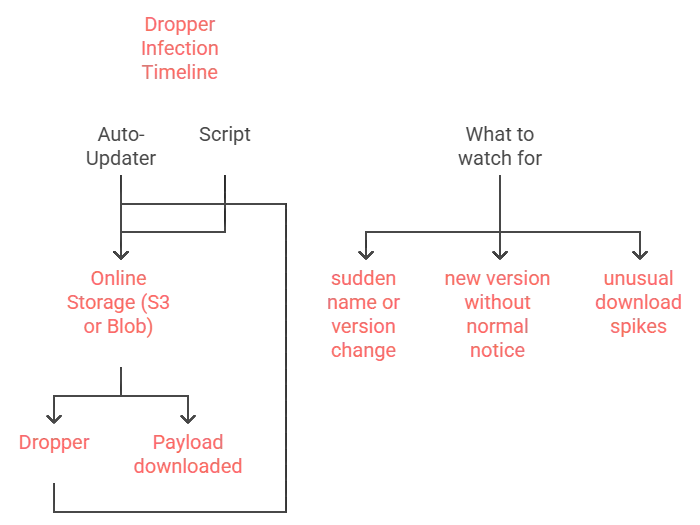
Droppers live in S3, Blob Storage, or similar buckets. They swap versions, use look-alike names, and deliver payloads at scale to auto-updaters or scripts that pull from cloud storage.
To keep droppers out of your systems, block public listing, require signed URLs, and verify checksums. Scan on upload and download, enable versioning alerts, and restrict who can write or change object ACLs.
6. Cross-Tenant Cloud Malware
Cross-tenant malware abuses flaws in multi-tenant SaaS. It crosses tenant boundaries and reaches data that belongs to other customers of the same service. Reduce risk by choosing vendors with clear tenant isolation and third-party tests. Limit high-risk SaaS permissions, turn on detailed activity logs, and use SaaS security tools to flag risky behavior and large data pulls.
| Learn More About How You Can Optimize Your Cloud Environment |
Cloud Migration Tips to Reduce Your Risks of Cloud Malware
Ultimately, 68% of cloud security issues are directly linked to cloud misconfigurations. For this reason, it’s crucial to ensure that your systems are correctly configured before you fully roll out your cloud services. Here are some key tips to follow.
| Tip | What to do | Cloud settings to use |
| Start from secure templates | Use a secure baseline before you build anything | Built-in policies and blueprints in your cloud account |
| Require multifactor sign-in | Turn on MFA for every user and every admin | Microsoft Entra ID MFA, AWS IAM MFA, Google 2-Step |
| Limit access by role | Give each person or app only what it needs | Role-based access controls and least-privilege roles |
| Protect admin accounts | Use hardware security keys for all admins | FIDO2 security keys and conditional access |
| Control app connections | Block self-service app installs. Require approval | Admin consent for OAuth apps and verified publishers |
| Keep secrets out of code | Store keys and passwords in a secure vault | Azure Key Vault, AWS Secrets Manager, Google Secret Manager |
| Close public access by default | Do not expose services to the internet unless required | Private links, firewalls, and allowlists |
| Lock down cloud storage | Keep buckets private. Turn on versioning and object lock | Bucket policies, private access, versioning, object lock |
| Turn on full logging | Record who did what and when across all services | Cloud audit logs and activity logs in each platform |
| Set alerts on risky changes | Get alerts for new admins, public shares, and policy edits | Built-in security centers and alert rules |
| Patch before go-live | Apply updates to images, runtimes, and services | Managed update services and maintenance windows |
| Scan software before release | Scan packages and images. Use signed releases | Pre-deploy and post-deploy scanners and signing tools |
| Add a web application firewall | Filter bad requests and block common attacks | Managed WAF in your cloud provider |
| Back up and test restores | Turn on snapshots and versioning. Run restore tests | Automated backups, snapshots, and recovery drills |
| Limit outbound traffic | Allow only the internet access your apps need | Egress rules and outbound firewall policies |
| Watch costs for spikes | Use budget alerts to catch cryptomining early | Budget limits, anomaly alerts, and spend reports |
| Review SaaS permissions | Remove risky or unused app access each month | App permission reviews and token revocation |
| Track changes with approvals | Use change control for high-risk settings | Change requests, approvals, and audit trails |
| Encrypt data by default | Encrypt data at rest and in transit | Managed keys and TLS settings |
| Practice incident response | Write simple playbooks. Run short drills with your team | Contact lists, runbooks, and monthly tabletops |
Ask Our Team How You Can Prevent Cloud Malware Attacks
You can implement any of our recommendations if you don’t have the experts who can roll them out and maintain them. Hiring additional staff is an option, but it can be costly.
Instead, outsource cloud security to Antisyn. We employ a team of cloud specialists who can help you migrate securely and enhance your cloud protections when you’re already there. Our cybersecurity services are available throughout the state of Florida, including Jacksonville.
Reach out today to learn more.
